
WaveKat Voice is a desktop softphone that connects to your 2talk account over SIP and records and transcribes every call automatically. It runs on Mac and Linux, it is free during the public beta, and there is no monthly subscription — so it is a way to put your 2talk number on your computer without paying for Bria.
2talk is in WaveKat Voice’s guided provider list, so you don’t hand-edit SIP fields — you pick 2talk and enter your number and password.
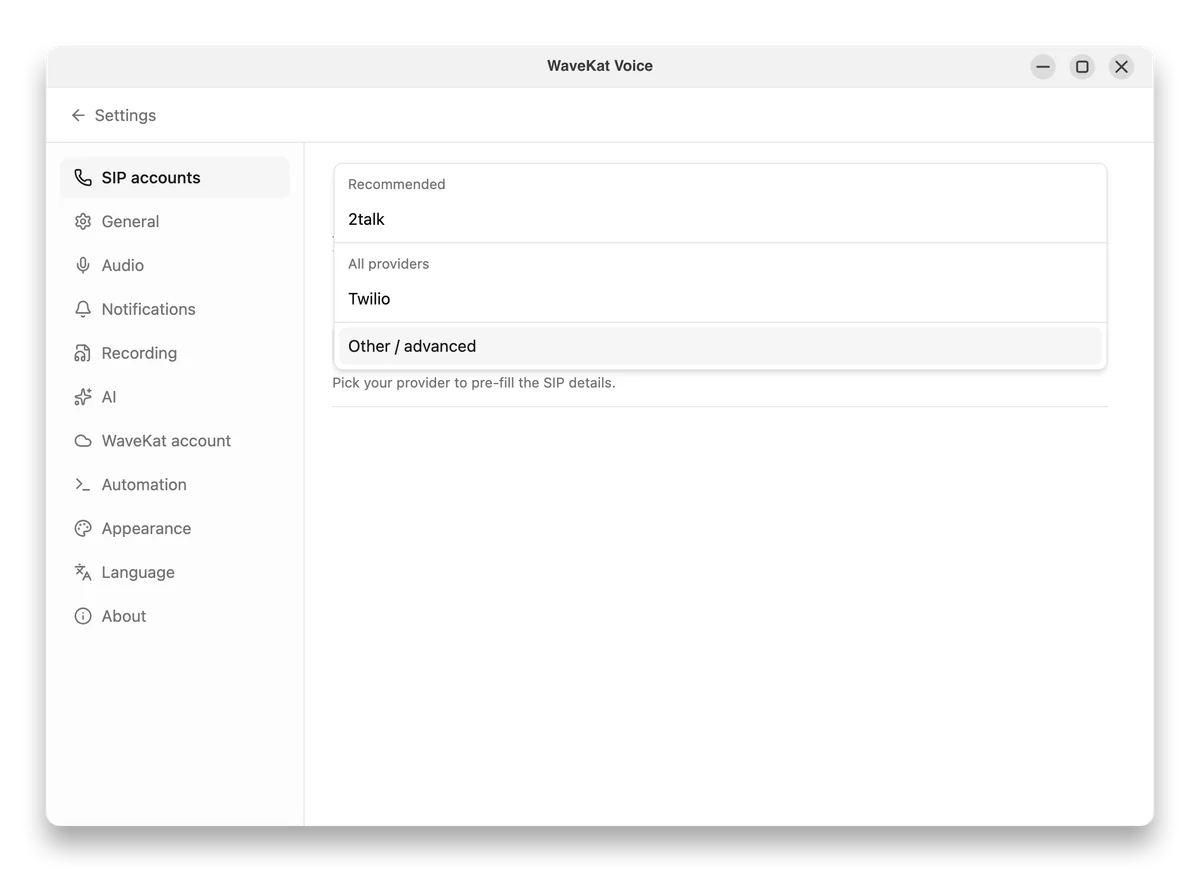
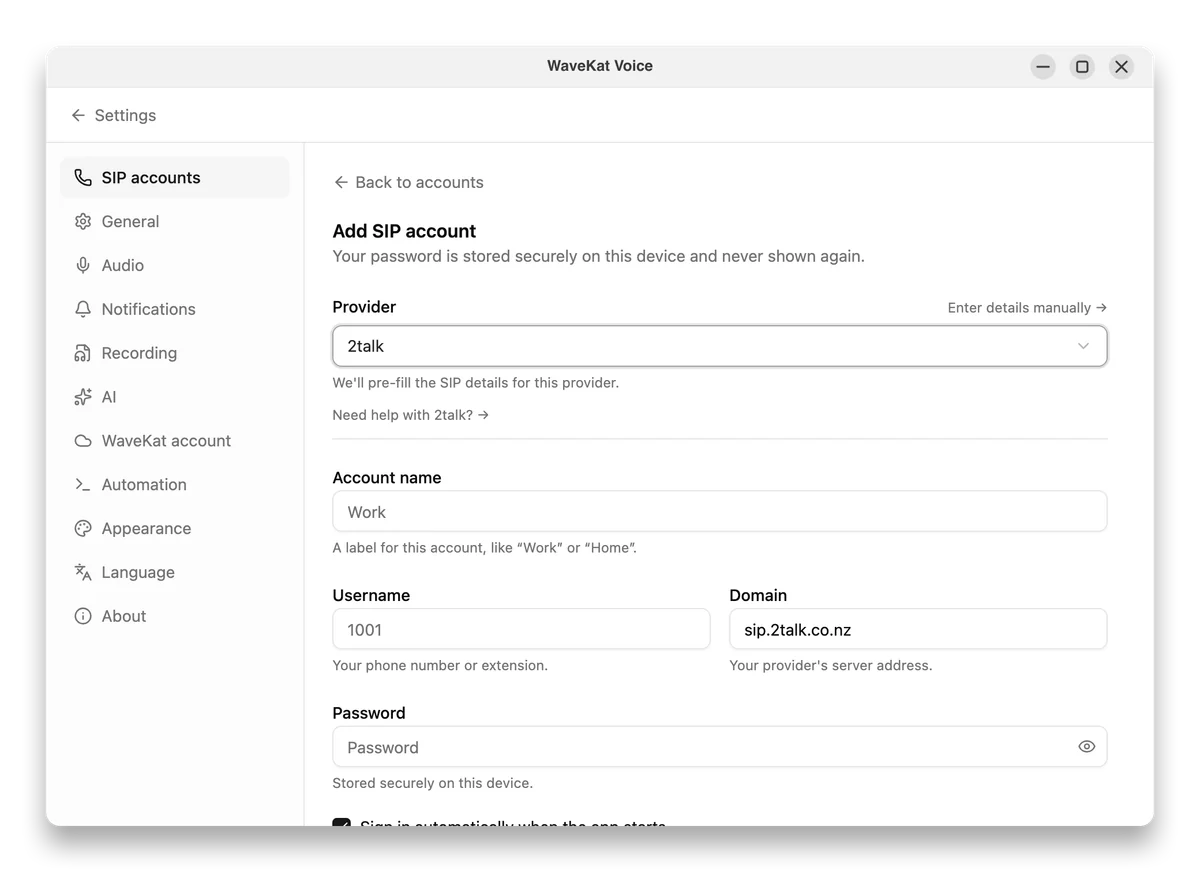
Prefer to enter it by hand? For most New Zealand accounts, 2talk uses a single SIP server — sip.2talk.co.nz — for the domain, proxy, and outbound proxy. (2talk’s newer Lyra platform uses its own settings.) Pick 2talk in WaveKat Voice and it fills these in for you.
| WaveKat Voice | Bria (via 2talk) | MicroSIP | |
|---|---|---|---|
| Price | Free during the public beta; paid later. | NZ$5.95 + GST / month via 2talk (as of July 2026), up to 4 devices. | Free and open source. |
| Platforms | Mac and Linux today (Windows when there is demand). | Windows, Mac, iOS, and Android. | Windows only. |
| Records every call | Automatic — every call recorded the moment you hang up. | Manual per call; call recording is a paid tier. | Manual recording per call. |
| Written transcript | Live transcript, kept with the recording. | No transcription. | No transcription. |
| Searchable call history | Calls, recordings, and transcripts in one searchable history. | Call log; recordings if you subscribe. | Call log only. |
| 2talk setup | Pick 2talk from a list; enter your number and password. | Provisioned by 2talk when you buy it from them. | Enter the generic SIP fields yourself. |
| Mobile & push notifications | Desktop only — no phone app or mobile push. | iOS and Android apps with push notifications. | No mobile app (Windows desktop only). |
2talk is a New Zealand VoIP provider that gives you a phone number and SIP credentials. For apps, it points you at its own 2talk Connect softphone and resells Bria, a paid softphone, at NZ$5.95 + GST per month — and because your account is standard SIP, any SIP softphone can register with it too.
Yes. WaveKat Voice is a SIP softphone and 2talk is in its guided provider list, so you pick 2talk, enter your 2talk number and SIP password, and it registers — no manual SIP configuration. It works on Mac and Linux, and every call is recorded and transcribed automatically.
If you want a subscription-free desktop softphone for 2talk that also records and transcribes every call, WaveKat Voice is built for that on Mac and Linux. 2talk’s own paid pick, Bria, covers Windows and mobile; MicroSIP is free but Windows-only.
Bria bought through 2talk costs NZ$5.95 + GST per month (as of July 2026). The free options are MicroSIP on Windows and WaveKat Voice on Mac and Linux, which is free during its public beta. Both register with your 2talk number over SIP.
Yes. Any SIP softphone can register a 2talk number on a Mac — including 2talk’s resold Bria app and WaveKat Voice. WaveKat Voice adds automatic call recording and transcription and doesn’t charge a monthly fee during the beta.
No — WaveKat Voice is a desktop app for Mac and Linux and doesn’t run on phones, so it can’t deliver mobile push notifications. For reliable incoming calls on an iPhone or Android with 2talk, use Bria or Acrobits Groundwire. On the desktop, WaveKat Voice stays registered and rings while the app is open.
In WaveKat Voice, add an account, pick 2talk from the provider list, and enter your 2talk number and SIP password — the SIP settings are filled in for you. For most New Zealand accounts, 2talk uses one SIP server, sip.2talk.co.nz, for the domain, proxy, and outbound proxy; 2talk’s newer Lyra platform uses its own settings, so use the details 2talk gives you if your account is on Lyra.
Questions, feedback, or a device you wish we supported? Email is the best way to reach us — we read every message and reply as soon as we can.
Email usOr write to eason@wavekat.com directly.